
Uncategorized
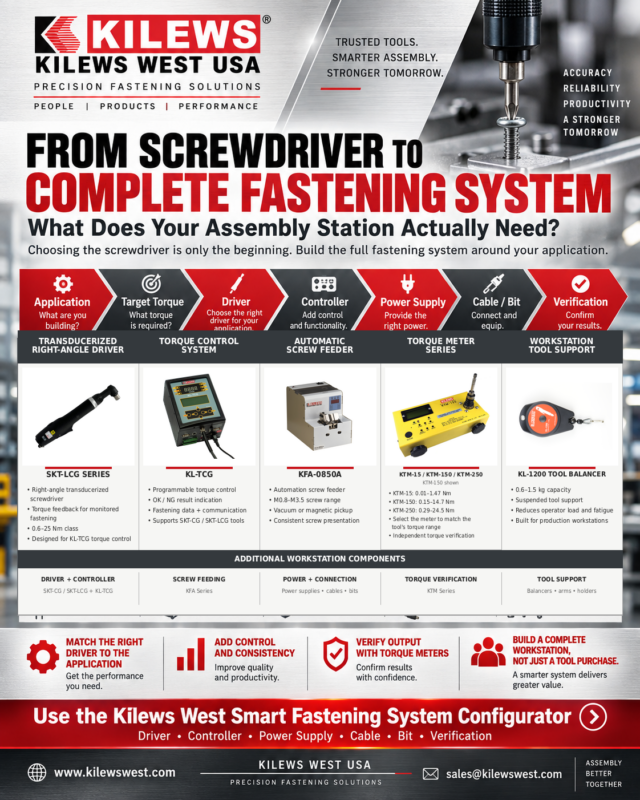
From Screwdriver to Complete Fastening System: What Does Your Assembly Station Actually Need?
Sep
Choosing an industrial screwdriver is only the beginning.
A production fastening station can include far more than the driver itself. Depending on the application, the complete setup may also require a controller, power supply, cable, driver bit, torque arm, screw feeder, verification equipment and other accessories.
That is why selecting components individually can become complicated quickly.
The better approach is to build the fastening system around the assembly process.
A practical system-selection path looks like this:
Application → Target Torque → Driver → Controller → Power Supply → Cable + Bit → Support Equipment → Verification
When those components are selected together, manufacturers can create a fastening station designed around productivity, repeatability and operator efficiency rather than simply purchasing a screwdriver and trying to build around it afterward.
Start With the Application
Before looking at model numbers, define the job.
Ask:
- What are you assembling?
- What material is being fastened?
- What type and size of fastener is being installed?
- What is the target torque?
- How many fastening cycles will be completed per shift?
- Does the operator need to move around the assembly?
- Is access to the fastener restricted?
- Is ESD protection required?
- Does the station need screw counting?
- Does the process require torque verification?
- Will the workstation eventually connect to automation or a PLC?
These questions determine what kind of system you actually need.
A lightweight electronics workstation may require a very different solution from an appliance assembly line or higher-torque mechanical fastening application.
Step 1: Choose the Correct Driver
The screwdriver is the center of the fastening station, but it should be selected according to the process—not simply by maximum torque.
Important considerations include:
Torque range
The target torque should fall comfortably inside the tool’s usable range.
Speed
Higher RPM can reduce rundown time, but faster is not automatically better for every fastener or material.
Start method
Production screwdrivers may be available in lever-start or push-start configurations.
Tool style
Inline, pistol-grip and right-angle tools each solve different ergonomic and access problems.
Power architecture
Some tools plug directly into AC power, while others operate through a dedicated DC power supply.
Kilews West offers several electric screwdriver platforms for different assembly requirements.
115VAC Direct Plug-In Screwdrivers
For fixed production stations where a simple installation is important, a direct-plug-in screwdriver can reduce the number of components required at the workstation.
The Kilews West SK-B5 Series uses brushless motor technology, plugs directly into 115VAC power and covers approximately 0.15–2.16 Nm, depending on the model. Lever-start, push-start and right-angle configurations are available.
For the right application, this can create a straightforward system:
Screwdriver → Bit → Fastener
No separate screwdriver power supply is required.
32V Brushless Screwdrivers
Other assembly stations benefit from a separate power supply architecture.
The Kilews West SKD-BN Series 32V brushless screwdrivers cover approximately 0.02–2.94 Nm and are available in multiple speeds, torque ranges, lever-start and push-start configurations, along with standard and ESD housing options.
These tools require a compatible 32VDC power supply.
That adds another component to the system, but it also creates opportunities to add additional control devices between the screwdriver and power supply.
That is where a production fastening station can become much more sophisticated.
Step 2: Does the Tool Need a Controller?
Not every screwdriver requires an advanced controller.
For a simple fastening application, the tool and appropriate power supply may be enough.
Other applications may benefit from additional process control.
A controller can add capabilities such as:
- screw counting
- slow start
- fastening-cycle timing
- OK / NG indication
- remote start
- tool enable/disable
- PLC outputs
- batch completion signals
The key question is:
What information or control does the production process require beyond simply reaching torque?
Slow Start Can Improve Process Control
Some fastening applications benefit from starting the screw at a lower speed before transitioning to full screwdriver speed.
This can be useful where careful thread engagement is important.
Kilews West offers the KL-SSBN and KL-SCBSN Slow Start & I/O Control Modules for compatible SKD-BN Series screwdrivers.
These modules allow slow-start speed to be adjusted from approximately 30% to 100% of full speed, with programmable slow-start timing up to 9.9 seconds. Depending on the module, additional remote inputs and outputs can also be incorporated into the fastening station.
This means a system can evolve from:
Screwdriver → Power Supply
into:
Screwdriver → Slow Start / I/O Module → Power Supply
The screwdriver has not changed.
The process control around it has.
Step 3: Do You Need Screw Counting?
Missing fasteners can be a serious quality problem.
If an assembly requires eight screws, simply reaching the correct torque does not confirm that all eight fastening operations occurred.
A counting controller can help address this.
The Kilews West SKP-BC32HL-100 Counting Controller is compatible with SKD-BN2, BN5 and BN7 Series screwdrivers and provides programmable batch counting.
The controller can display the current screw count, provide an audible batch-complete indication and evaluate fastening-cycle time against programmable minimum and maximum limits. It can also provide OK / NG rundown indication and external I/O connections.
The batch count can be programmed from 1 to 99 fasteners, and the controller includes external inputs and outputs for functions including remote start, reverse, disable, confirm, enable, clear and OK/NG signaling.
That can turn a conventional screwdriver station into a more controlled assembly process.
Instead of only asking:
“Did the screwdriver reach torque?”
the station can also help answer:
“Did the expected number of fastening cycles occur?”
Step 4: Match the Correct Power Supply
For screwdriver systems requiring DC power, the power supply must be compatible with the selected tool.
This sounds obvious, but it is one of the reasons a system configurator can be useful.
A screwdriver, controller and power supply are not necessarily interchangeable.
For example, the Kilews West 32V brushless screwdriver family includes compatible power supplies designed to convert plant AC power to the DC power required by the screwdriver.
Selecting the screwdriver first and then choosing a random power supply based only on voltage is not the best approach.
The tool, controller and power supply should be treated as one system.
Step 5: Don’t Forget the Cable and Bit
Two of the smallest components in a fastening station can create some of the biggest headaches when they are overlooked.
Tool Cables
Cable length affects workstation layout.
A cable that is too short can restrict operator movement.
A cable that is excessively long can create unnecessary clutter.
Some controllers and I/O modules may also require a specific shielded cable rather than the standard cable supplied with the screwdriver.
The fastening station should therefore account for:
tool position → controller position → cable routing → operator movement
rather than selecting cable length as an afterthought.
Driver Bits
The screwdriver only transfers torque to the fastener through the bit.
The correct bit depends on:
- fastener drive style
- fastener size
- bit holder
- required reach
- application access
Phillips, hex and other drive styles must be properly matched.
A worn or incorrectly sized bit can undermine an otherwise well-designed fastening process.
Step 6: Does the Operator Need Tool Support?
As production volume increases, ergonomics become increasingly important.
Holding even a relatively lightweight screwdriver for thousands of cycles per shift can contribute to operator fatigue.
Higher-torque applications can also introduce torque reaction.
Depending on the application, a complete workstation may benefit from:
Spring balancers
These suspend the tool above the workstation and reduce the effective weight the operator must repeatedly lift.
Torque arms
These can help support the tool, control movement and absorb torque reaction.
Tool stands and suspension equipment
These help maintain a consistent workstation layout and keep the screwdriver readily accessible.
This changes the way you think about the tool.
Instead of asking:
“Can the operator use this screwdriver?”
ask:
“Can the operator comfortably use this screwdriver hundreds or thousands of times per shift?”
Those are very different questions.
Step 7: Is Screw Pickup Slowing the Station Down?
The screwdriver is not always the bottleneck.
Sometimes the operator spends more time finding and positioning the next screw than actually fastening it.
That is where a screw feeder or screw presenter can become part of the complete system.
Instead of repeatedly reaching into a bin, separating a fastener and orienting it manually, a screw feeder can present the next fastener in a predictable location.
A production station might therefore evolve into:
Screw Feeder → Operator → Screwdriver → Controller → Power Supply
This can reduce unnecessary hand movement and make the fastening cycle more consistent.
For higher-volume assembly, improving screw presentation can sometimes produce a greater productivity improvement than simply increasing screwdriver RPM.
Step 8: How Will You Verify Torque?
Setting the screwdriver is not the same as verifying it.
A professional fastening process should include a method for confirming actual screwdriver output.
Kilews West offers the KTM torque meter family for electric screwdriver verification.
Current models include:
KTM-15: 0.01–1.47 Nm
KTM-150: 0.15–14.7 Nm
KTM-250: 0.29–24.5 Nm
These torque meters are specified at ±0.5% accuracy, include a certificate of calibration and can store up to 800 readings. They can also display minimum, maximum and average torque values across groups of rundowns.
This adds another layer to the system:
Select the tool → Set the torque → Verify the output
Verification gives production and quality teams confidence that the screwdriver is continuing to perform as expected.
A Complete Fastening Station Might Look Like This
Consider a repetitive assembly application using a 32V electric screwdriver.
A basic system could be:
**SKD-BN Screwdriver
- Compatible 32V Power Supply
- Driver Bit**
A more controlled workstation could become:
**SKD-BN Screwdriver
- Slow Start / I/O Module
+ 32V Power Supply - Correct Cable
- Driver Bit
- Tool Balancer**
A higher-control production station might include:
**SKD-BN Screwdriver
- Counting Controller
- Correct Cable
- Bit
- Torque Arm
- Screw Feeder
- KTM Torque Meter**
The right configuration depends entirely on the production requirement.
There is no reason to add equipment the application does not need.
But there is also little value in purchasing a screwdriver that cannot support the complete process the manufacturer ultimately wants to build.
Why Component Compatibility Matters
A fastening system is only as good as the way its components work together.
Problems can occur when components are selected independently.
For example:
- the screwdriver may require a different power supply
- a controller may only support specific tool families
- the cable may not be appropriate for the control system
- a torque arm may not suit the tool weight or torque
- the driver bit may not match the fastener
- the torque meter may not cover the required measurement range
This is why building a fastening system manually from separate product pages can be difficult.
Manufacturers do not necessarily need more choices.
They need a faster way to narrow the choices to compatible components that fit the application.
Introducing the Kilews West Smart Fastening System Configurator
The Kilews West Smart Fastening System Configurator is designed to help simplify this process.
Instead of beginning with hundreds of individual products, start with the requirements of your assembly.
Enter the information that matters to the fastening process, such as:
Application
What are you building?
Target Torque
What torque does the joint require?
Tool Style
Do you need inline, pistol-grip or right-angle access?
Power Requirements
Does the workstation need a direct AC tool, a DC system or cordless operation?
Process Control
Does the station require slow start, counting or additional control capabilities?
Verification
How will torque output be confirmed?
The configurator can then help narrow the available Kilews West products toward the components that are most closely related to the application.
Think in Systems, Not Individual Products
The biggest change in industrial fastening is not necessarily the screwdriver itself.
It is how manufacturers think about the fastening station.
Instead of:
“Which screwdriver should I buy?”
the better question is:
“What fastening system does this assembly require?”
That system may include:
Driver
Controller
Power Supply
Cable
Bit
Torque Arm
Tool Balancer
Screw Feeder
Torque Verification
Accessories
Each component has a purpose.
And when the system is designed correctly, those components work together to support a more repeatable and productive assembly process.
Build Your Fastening System With Kilews West
Whether you are creating a new production station or improving an existing one, start with the application.
Define the torque.
Choose the correct tool.
Then build the supporting system around it.
The Kilews West Smart Fastening System Configurator can help you narrow the available options and identify the equipment that best matches your production requirements.
Don’t just choose a screwdriver.
Build the fastening system around the job.
Kilews West USA
Top Quality. Excellent Service. Progressive Design.
